
Conversion rate optimisation software
Find what's costing you sales
See which gaps in your traffic are real, with the session replays to prove it, and fix the one that costs most first.

- 1Where it happens
Thousands of recordings, grouped so you can see who drops off, and at which step.
- 2Why it matters
Only differences that are real, not chance, make it through.
- 3What to do about it
The principle that fixes it.
Sound familiar?
You can see the drop. You can't see what to fix.
Too many replays, too little signal
A site records thousands of sessions a week. Whichever few you happen to watch end up shaping what gets fixed.
Insights split across tools
Event data and totals live in one place, session recordings in another. Each holds part of the story, so the bigger picture is hard to see. Data Drivven brings them together.
Hard to know what to fix first
There's always more to fix than time to fix it, and it's hard to tell which change would make the biggest difference. Data Drivven ranks each gap by the conversions it costs, so effort goes where it counts.
How it works
From noise to the few fixes worth making
Only the gaps that are real
Highlights what matters most in your traffic, and what's not worth looking at.
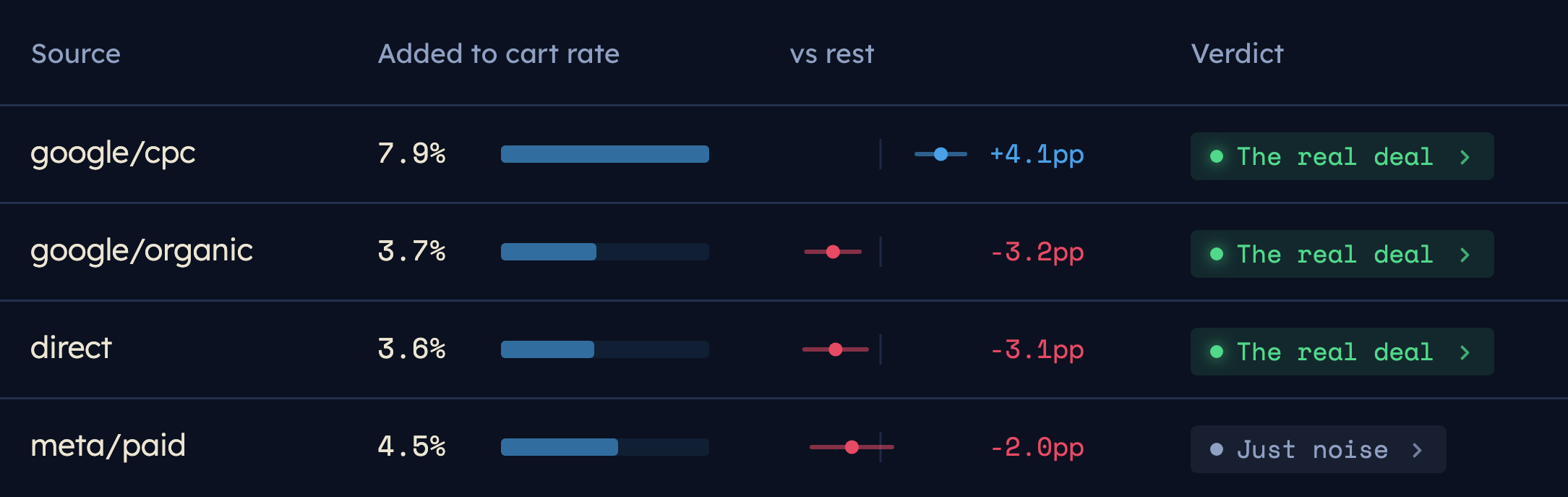
- Find a gap, then dig in. See where a device, source, campaign or landing page falls behind, then quickly cut it further, down to the funnel step and the sessions behind it.
- Straight to what matters. Real gaps stand out and noise is marked as noise, so your time goes on the few worth fixing.
- Quiet gaps say what they need. When a gap is too small to call, you see how many more sessions would settle it.
- Staff and customers set aside. Your own team and existing customers don't flatter the numbers.
Find the step where it breaks
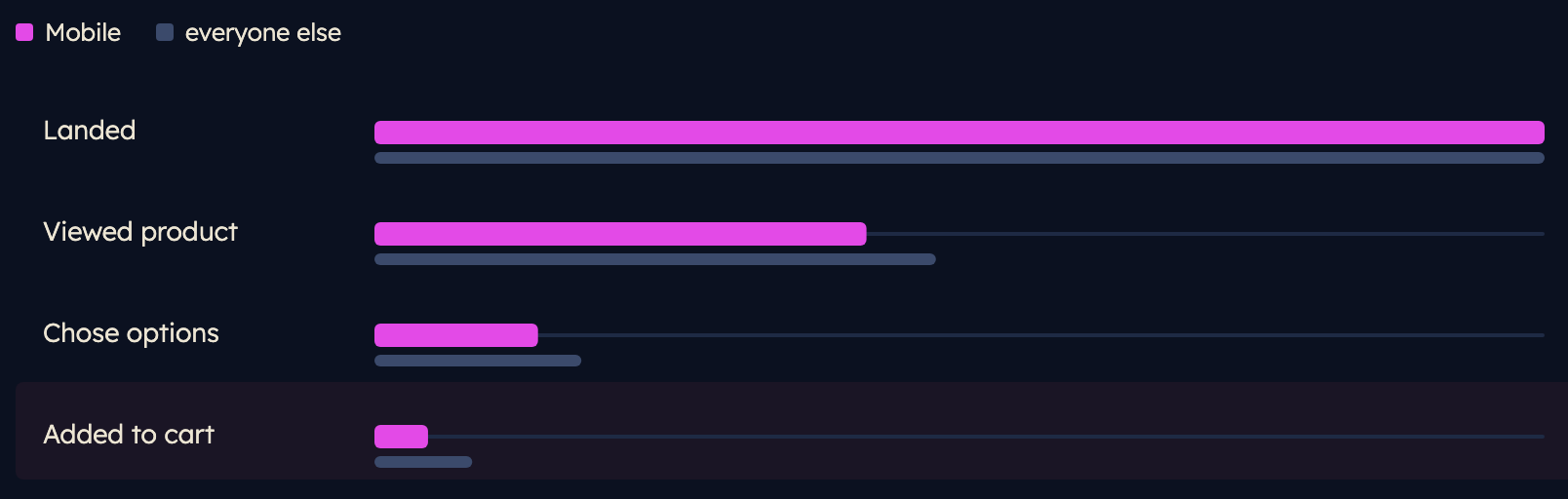
- Down to the step. Reach and step-to-step conversion for any segment, so you see the handoff where shoppers stop.
- Side by side. Mobile against Desktop, one campaign against another, a browser against everyone else.
- Flagged for you. The step where a segment falls away is marked, so you know where to look first.
- Back to the ad. UTM tags, click IDs and search terms stay on each session, so a problem traces back to the campaign that sent it.
The session replays that explain it
- Findings open their replays. Watch the sessions behind a gap, not a random sample.
- Closer to what visitors saw. Replays are repaired where common recorders slip, like a visitor opening a second tab or you skipping ahead, so the page looks the way it did for them.
- Form behaviour by field. Where people paused, corrected or hit an error, without recording what they typed.
- A written diagnosis. Top findings come with a short evidence card: what's happening, and which replays to watch.
What to fix, checked on the live pages
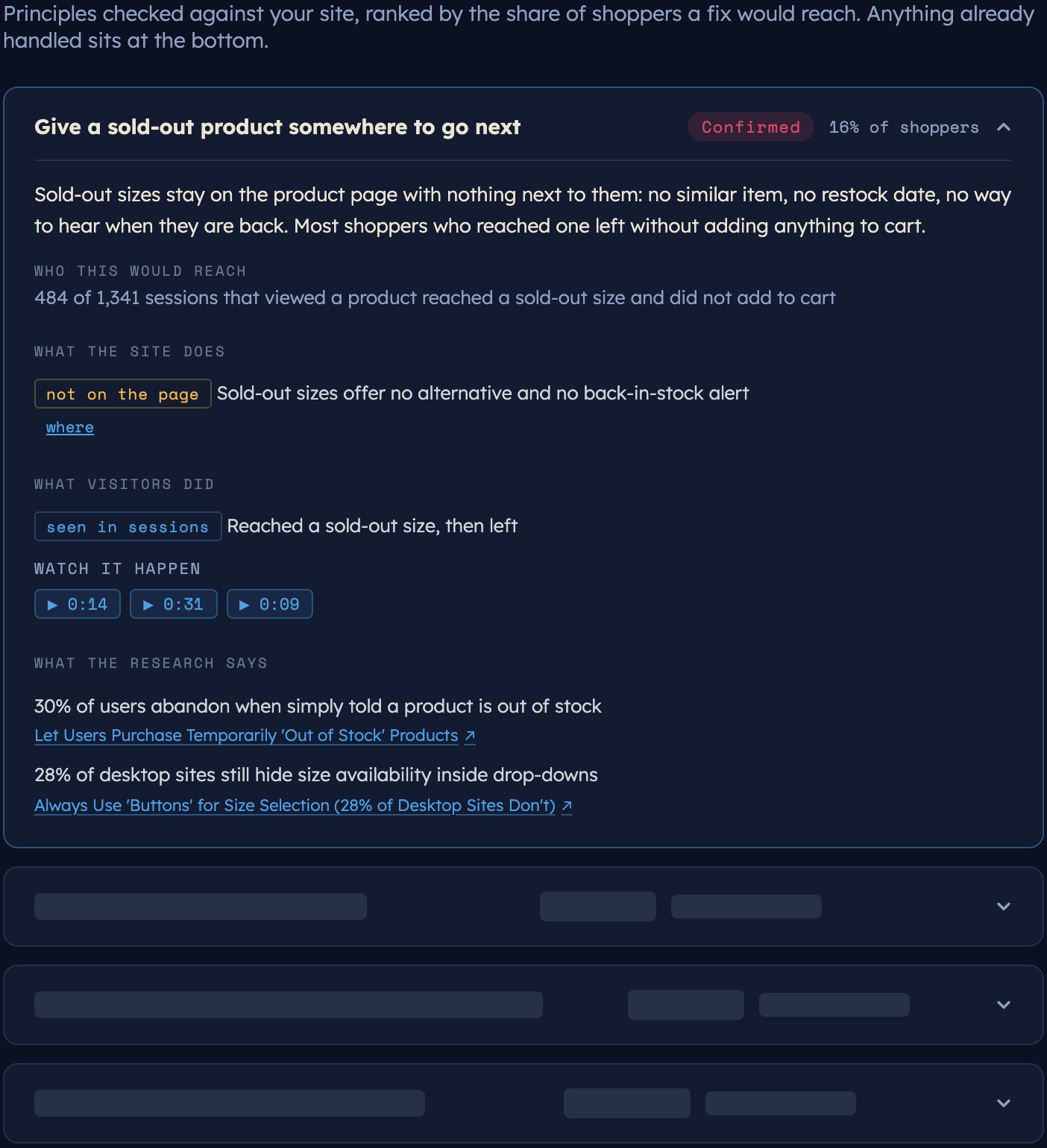
- Principles from published research. Product pages, forms and calls to action are checked against conversion principles, each with the study behind it.
- Sized by who it would reach. Each gap shows the share of shoppers a fix would meet, so the list starts with the biggest.
- Page and visitors, side by side. What the site does, and what visitors did about it, so a gap on the page is backed by behaviour.
- Handled steps aside. Principles the site already follows sit at the bottom, so the list stays short.
Know whether a change worked
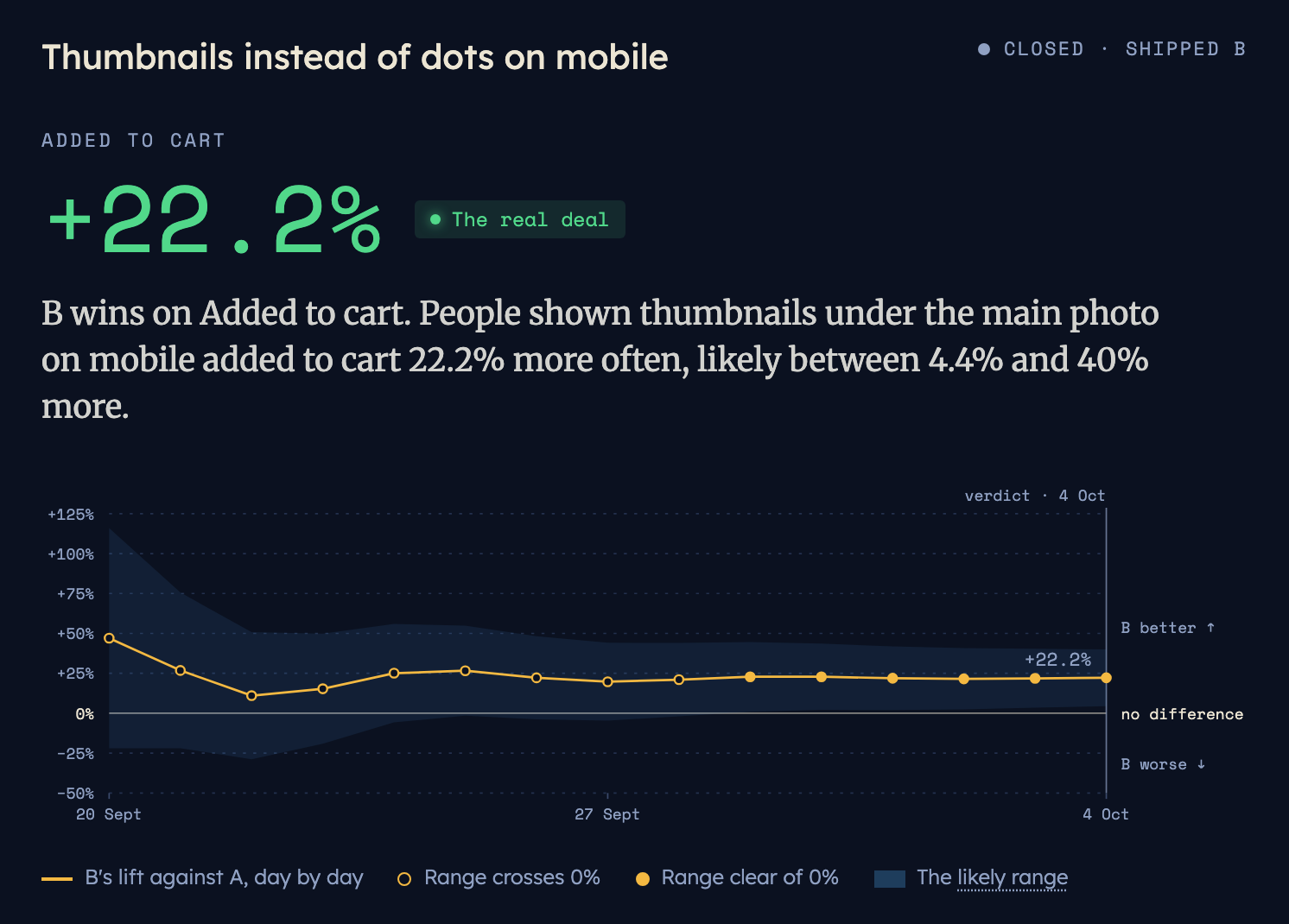
Test a fix against the live site, or log a change to the site, ads or tracking, and see whether conversion really moved, once there's enough traffic either side to call it.
One snippet
Pasted once, through Tag Manager or the site's head. It waits for the page, so the page loads first.
Typing masked
Form fields are masked in the browser before anything is sent.
Consent ready
Strict mode records nothing until the visitor agrees.
No ad platforms
Recordings go to Data Drivven only, never to an ad platform.
Built from real-world use
Built by someone who's been in your seat
Data Drivven was born out of wanting to understand what visitors were really doing across the sites its founder, Scott Buckland, works on: data you can dig into, statistics you can trust, and evidence of what actually happened, in one place.
Scott has helped businesses grow online since 2001, including four years leading digital marketing at Verizon Connect.
More about Scott →How it starts
Start with one
01
Request a demo
See the gaps costing you sales, why they happen, and which to fix first.
02
Add one snippet
Paste it once, through Tag Manager or your site's head. We check the site first, and set up the funnel with you.
03
14 days free
Findings fill from the first day of traffic. After 14 days, look at what it found and decide whether to carry on.
FAQ
Common questions
What do you need from us?
Access to your Tag Manager, or someone who can paste one short snippet into your site's head. Nothing else on your site changes.
Will it slow the site down?
The snippet is deferred, so the page loads first.
What about privacy and consent?
Form fields are masked in the browser before anything is sent, and nothing is read from a field unless it has been declared for that site. In strict consent mode, nothing is recorded until the visitor agrees.
How much traffic does a site need?
There's no fixed minimum. When a gap is too small to call, Data Drivven says so and shows how many sessions it would take.
Who sees the findings?
Your team, behind an email login. Anyone else sees only what you choose to share.
What happens after the 14 days?
We go through what it found together, and you decide whether to keep it running.
Get started
See what's costing you sales
Tell us your website. Here's what happens next.
- 01Within one business day
Scott emails you to find a time.
- 02The demo
A walk through it with your team: what it finds, and how you'd use it on your site.
- 03If it fits
Add one snippet to your site and get 14 days free.